Network Intelligence/Restcomm Configuration: Difference between revisions
William Wong (talk | contribs) |
mNo edit summary |
||
| (88 intermediate revisions by 4 users not shown) | |||
| Line 1: | Line 1: | ||
{{DISPLAYTITLE: | {{DISPLAYTITLE:Restcomm CPaaS Platform Configuration}} | ||
{| class="wikitable" | |||
|- | |||
|rowspan="3"|This article applies to: | |||
|'''Product''' | |||
|'''Version''' | |||
|- | |||
|SBC | |||
|3.0, 3.1 | |||
|} | |||
=Introduction= | =Introduction= | ||
This document provides instructions on how to configure | This document provides instructions on how to configure a ProSBC to interoperate with the [https://www.restcomm.com/ Restcomm] Communications Platform as a Service (CPaaS) system. <br/> | ||
Restcomm CPaaS platform provides programmable voice-like IVR service, programmable SMS service, mail, chat services and more, for service providers and enterprise customers. <br/> | |||
[[ProSBC]] acts as a Session Border Controller to protect the Restcomm CPaaS platform and provides many essential protection features for voice communications over SIP and RTP traffic. <br/> | |||
With the following example below, a softphone - PhonerLite, and a real mobile phone are used to provide an originating endpoint that will call through [[ProSBC]] to the Restcomm platform. <br/> | |||
Furthermore, in this example, [[ProSBC]] AWS is used, but in fact, any [[ProSBC]] platform will be able to achieve the same setup. <br/> | |||
=Network Diagram and Call Scenarios= | =Network Diagram and Call Scenarios= | ||
This section provides the simplified network diagram containing Softphone, Mobile phone, service provider, | This section provides the simplified network diagram containing Softphone, Mobile phone, service provider, ProSBC, Restcomm system, and the call flow scenarios. | ||
# '''Restcomm welcome announcement''' - PhonerLite sends 'direct call' to ProSBC with called information 1234@52.60.132.155 where 52.60.132.155 is the public Elastic IP used for voip interface in this ProSBC AWS. ProSBC makes a mapping of the called number to 1234@netg2.restcomm.com before making an outgoing call to the Restcomm platform. PhonerLite hears a welcome greeting from Restcomm platform. Configuration steps (available in different sections of PhonerLite Configuration, ProSBC Configuration below):[[File:Restcomm_welcome_announcement.PNG|1000px]] | |||
##[[Network_Intelligence/Restcomm_Configuration#PhonerLite_direct_call_setting|PhonerLite direct call setting]] | |||
##[[Network_Intelligence/Restcomm_Configuration#ProSBC Local NAT Traversal setting|ProSBC Local NAT Traversal setting]] | |||
##[[Network_Intelligence/Restcomm_Configuration#ProSBC NAPs setting|ProSBC NAPs setting]] | |||
##[[Network_Intelligence/Restcomm_Configuration#ProSBC routes setting|ProSBC routes setting]] | |||
##[[Network_Intelligence/Restcomm_Configuration#ProSBC route called remapping|ProSBC route called remapping]] | |||
# '''IVR DTMF acknowledgement''' - PhonerLite sends 'direct call' to ProSBC with called information 1234@52.60.132.155. ProSBC makes a mapping of called number to 1234@netg2.restcomm.com before making outgoing call to Restcomm platform. PhonerLite hears welcome greeting from Restcomm platform with IVR to acknowledge the DTMF tones pressed. Same configuration steps as in call flow 1 with addition of [[Network_Intelligence/Restcomm_Configuration#PhonerLite_direct_call_setting|PhonerLite DTMF setting]] :[[File:IVR_DTMF_acknowledgement.PNG|1000px]] | |||
# '''IVR DID full number''' - PhonerLite sends 'direct call' to ProSBC with called information 1234@52.60.132.155. ProSBC makes a mapping of called number to 13105894010@netg2.restcomm.com before making outgoing call to Restcomm platform. PhonerLite hears welcome greeting from Restcomm platform with IVR to acknowledge the DTMF tones pressed. Same configuration steps as in call flow 1 with addition of [[Network_Intelligence/Restcomm_Configuration#PhonerLite_direct_call_setting|PhonerLite DTMF setting]] :[[File:IVR_DID_full_number.PNG|1000px]] | |||
# '''Calling DID registered called number with IVR''' - Mobile phone is calling an international number 902129550330 through Mobile operator and SIP provider. 902129550330 is a registered number in SIP provider. ProSBC registering to this SIP provider (NAP) as a user for this 90212955033 and act as a termination point for this number. Once Mobile phone calling 902129550330, ProSBC detecting this called the number and forward it out, with remapping called number of 13105894010@netg2.restcomm.com to Restcomm platform. This call will also get IVR DTMF acknowledgment for DTMF tones pressed. Same configuration steps as in call flow 3 with addition of [[Network_Intelligence/Restcomm_Configuration#ProSBC register to NAP with username and password|ProSBC register to NAP with username and password]] :[[File:Calling_DID_registered_called_number_with_IVR.PNG|1000px]] | |||
# '''IVR DID full number outside call''' - PhonerLite sends 'direct call' to ProSBC with called information 1234@52.60.132.155. ProSBC makes a mapping of called number to 13105894010@netg2.restcomm.com before making an outgoing call to Restcomm platform. PhonerLite hears a welcome greeting from Restcomm platform with IVR to ask the caller to press '1', which will enable a separate call back from Restcomm platform. This separate call back is then routed through ProSBC to the SIP provider and Telecom operator and onto an outside number of a Telecobridges office phone number set. Same configuration steps as in call flow 4. | |||
[[File:IVR_DID_full_number_outside_call.PNG|1000px]] | |||
=PhonerLite Configuration= | =PhonerLite Configuration= | ||
| Line 46: | Line 39: | ||
==PhonerLite direct call setting== | ==PhonerLite direct call setting== | ||
The following section are required to set up the outbound direct call on PhonerLite, | |||
'''Server''' setting: All Proxy/Registrar and Domain/Realm are empty | |||
[[File:PhonerLite_direct_call_Server.png|500px]] | |||
'''User''' setting | |||
[[File:PhonerLite_direct_call_User.png|500px]] | |||
'''Network''' setting | |||
[[File:PhonerLite_direct_call_Network.png|500px]] | |||
'''Codecs and DTMF''' setting | |||
[[File:PhonerLite_direct_call_Codecs_and_DTMF.png|500px]] | |||
For dial out, we can specify the called number as 1234@52.60.132.155 where 52.60.132.155 is the public Elastic IP used for voip interface in this ProSBC AWS. | |||
=ProSBC Configuration= | |||
This section provides ProSBC configurations for the solution. | |||
==ProSBC Local NAT Traversal setting== | |||
* See NAT section in [[Toolpack:Tsbc IP Network Settings 3.0]] | |||
==ProSBC NAPs setting== | |||
* See [[Toolpack:Allocating a SIP Network Access Point (NAP) SBC A|Create SIP NAP]] and [[Toolpack:Allocating a SIP Open Network Access Point (NAP) SBC A|Create Open NAP]] | |||
** Here, SIP NAP will be Restcomm NAP and Service Provider NAP, and Open NAP will be from PhonerLite | |||
==ProSBC register to NAP with username and password== | |||
* The following sections need to be set, as in example below, | |||
[[File:ProSBC register to NAP with username and password.png|700px]] | |||
* In this example, ProSBC is behind NAT, so local NAT method is set | |||
==ProSBC routes setting== | |||
* See [[Toolpack:Creating a First Call Route E|Create a Static Route]] | |||
** Here, we set the SIP end points (NAP) to and from as required in each call flow scenario | |||
==ProSBC route called remapping== | |||
* The following section needs to be set, and depending what called number remapping required as in each call flow scenario, | |||
[[File:ProSBC route called remapping.png|700px]] | |||
: | |||
== | == References == | ||
*[https://www.telestax.com/ Communications Platform as a Service(CPaas)] | |||
* | *[https://www.restcomm.com/ Cloud based Voice and SMS APIs] | ||
* | |||
Latest revision as of 10:15, 16 May 2022
| This article applies to: | Product | Version |
| SBC | 3.0, 3.1 |
Introduction
This document provides instructions on how to configure a ProSBC to interoperate with the Restcomm Communications Platform as a Service (CPaaS) system.
Restcomm CPaaS platform provides programmable voice-like IVR service, programmable SMS service, mail, chat services and more, for service providers and enterprise customers.
ProSBC acts as a Session Border Controller to protect the Restcomm CPaaS platform and provides many essential protection features for voice communications over SIP and RTP traffic.
With the following example below, a softphone - PhonerLite, and a real mobile phone are used to provide an originating endpoint that will call through ProSBC to the Restcomm platform.
Furthermore, in this example, ProSBC AWS is used, but in fact, any ProSBC platform will be able to achieve the same setup.
Network Diagram and Call Scenarios
This section provides the simplified network diagram containing Softphone, Mobile phone, service provider, ProSBC, Restcomm system, and the call flow scenarios.
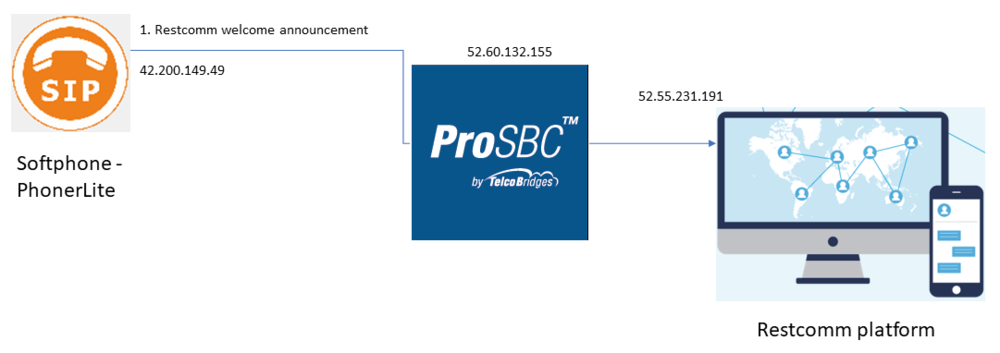
- Restcomm welcome announcement - PhonerLite sends 'direct call' to ProSBC with called information 1234@52.60.132.155 where 52.60.132.155 is the public Elastic IP used for voip interface in this ProSBC AWS. ProSBC makes a mapping of the called number to 1234@netg2.restcomm.com before making an outgoing call to the Restcomm platform. PhonerLite hears a welcome greeting from Restcomm platform. Configuration steps (available in different sections of PhonerLite Configuration, ProSBC Configuration below):
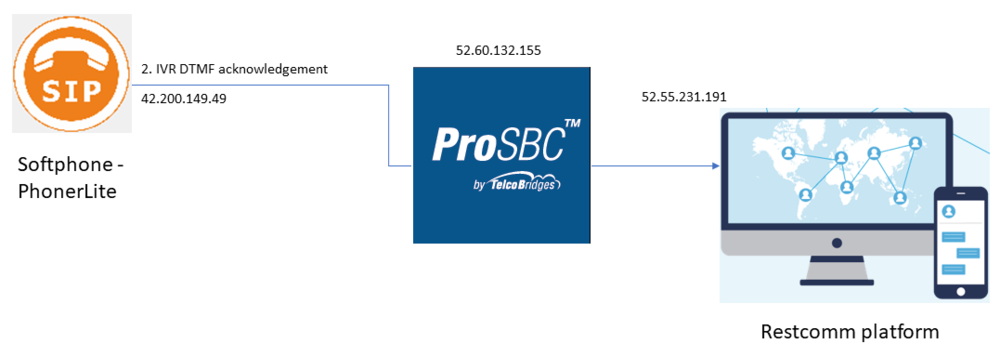
- IVR DTMF acknowledgement - PhonerLite sends 'direct call' to ProSBC with called information 1234@52.60.132.155. ProSBC makes a mapping of called number to 1234@netg2.restcomm.com before making outgoing call to Restcomm platform. PhonerLite hears welcome greeting from Restcomm platform with IVR to acknowledge the DTMF tones pressed. Same configuration steps as in call flow 1 with addition of PhonerLite DTMF setting :
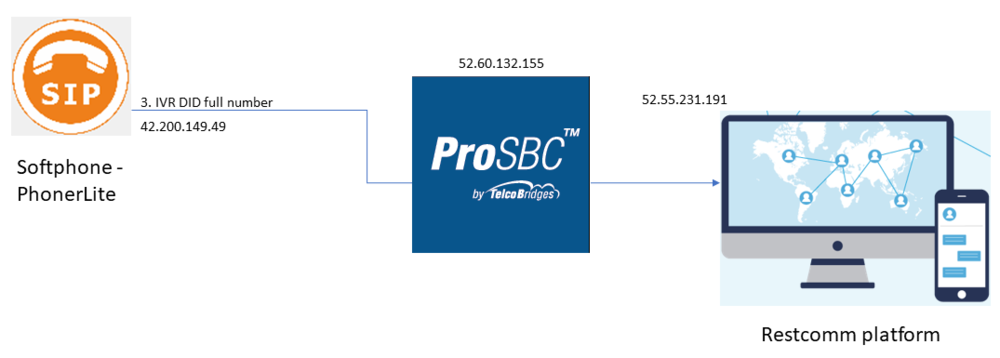
- IVR DID full number - PhonerLite sends 'direct call' to ProSBC with called information 1234@52.60.132.155. ProSBC makes a mapping of called number to 13105894010@netg2.restcomm.com before making outgoing call to Restcomm platform. PhonerLite hears welcome greeting from Restcomm platform with IVR to acknowledge the DTMF tones pressed. Same configuration steps as in call flow 1 with addition of PhonerLite DTMF setting :
- Calling DID registered called number with IVR - Mobile phone is calling an international number 902129550330 through Mobile operator and SIP provider. 902129550330 is a registered number in SIP provider. ProSBC registering to this SIP provider (NAP) as a user for this 90212955033 and act as a termination point for this number. Once Mobile phone calling 902129550330, ProSBC detecting this called the number and forward it out, with remapping called number of 13105894010@netg2.restcomm.com to Restcomm platform. This call will also get IVR DTMF acknowledgment for DTMF tones pressed. Same configuration steps as in call flow 3 with addition of ProSBC register to NAP with username and password :

- IVR DID full number outside call - PhonerLite sends 'direct call' to ProSBC with called information 1234@52.60.132.155. ProSBC makes a mapping of called number to 13105894010@netg2.restcomm.com before making an outgoing call to Restcomm platform. PhonerLite hears a welcome greeting from Restcomm platform with IVR to ask the caller to press '1', which will enable a separate call back from Restcomm platform. This separate call back is then routed through ProSBC to the SIP provider and Telecom operator and onto an outside number of a Telecobridges office phone number set. Same configuration steps as in call flow 4.


PhonerLite Configuration
This section provides PhonerLite configurations for the solution.
PhonerLite direct call setting
The following section are required to set up the outbound direct call on PhonerLite,
Server setting: All Proxy/Registrar and Domain/Realm are empty

User setting

Network setting

Codecs and DTMF setting

For dial out, we can specify the called number as 1234@52.60.132.155 where 52.60.132.155 is the public Elastic IP used for voip interface in this ProSBC AWS.
ProSBC Configuration
This section provides ProSBC configurations for the solution.
ProSBC Local NAT Traversal setting
- See NAT section in Toolpack:Tsbc IP Network Settings 3.0
ProSBC NAPs setting
- See Create SIP NAP and Create Open NAP
- Here, SIP NAP will be Restcomm NAP and Service Provider NAP, and Open NAP will be from PhonerLite
ProSBC register to NAP with username and password
- The following sections need to be set, as in example below,
File:ProSBC register to NAP with username and password.png

- In this example, ProSBC is behind NAT, so local NAT method is set
ProSBC routes setting
- See Create a Static Route
- Here, we set the SIP end points (NAP) to and from as required in each call flow scenario
ProSBC route called remapping
- The following section needs to be set, and depending what called number remapping required as in each call flow scenario,
File:ProSBC route called remapping.png
