TB Wiki
Menu
SBC
Overview
Features and Solutions
Installation
Configuration
Maintenance
Upgrades
Troubleshooting
Support
Tmedia
Overview
Features and Solutions
Installation
Configuration
Maintenance
Upgrades
Troubleshooting
Support
Tsig
Overview
Features and Solutions
Installation
Configuration
Maintenance
Upgrades
Troubleshooting
Support
Tmonitor
Overview
Features and Solutions
Installation
Configuration
Upgrades
Support
Customer Dashboard
User Guide
Search
What links here
Related changes
Special pages
Printable version
Permanent link
Page information
Recent changes
Help
Log in
Actions
Page
Discussion
View source
View history
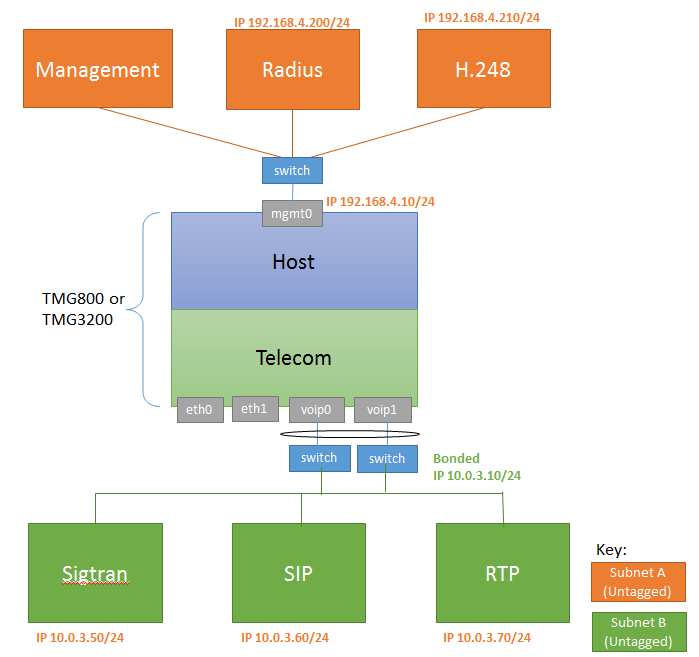
IP Network Configuration Use Case:Two subnets, One IP per subnet, untagged
Revision as of 17:14, 20 October 2016 by
Allyntree
(
talk
|
contribs
)
(
diff
)
← Older revision
|
Latest revision
(
diff
) |
Newer revision →
(
diff
)
Applies to version(s): v2.8, v.2.9, v2.10
Contents
1
Applies to version(s): v2.8, v.2.9, v2.10
2
Two subnets, One IP per subnet, untagged
Two subnets, One IP per subnet, untagged
Configure IP Network A
Configure IP Network B
Subnet A is accessed through MGMT0
MGMT0 network interface modification requires the use of the tbchangeip shell script
Use
tbchangeip
with the following parameters:
IP Address
: 192.168.4.10
Netmask
: 255.255.255.0
Default gateway
: 192.168.4.1
Subnet B is untagged and bonded over VOIP0 and VOIP1 ports.
Delete voip0 and voip1 virtual port
Create
VP_VOIP virtual port
:
Name
: VOIP_UNTAG
vLanId
: Untagged
Physical Ports
: voip0, voip1
Delete voip0 and voip1 IP Address
Create
VOIP_ADDRESS IP Address
:
Name
: VOIP_ADDRESS
Virtual Ports
: VP_VOIP
IP Address
: 10.0.3.10 bonded
Netmask
: 255.255.255.0
Services
: RTP, SIP, SIGTRAN
Configure SIP
Configure SIGTRAN
Configure H.248
Configure RADIUS
Configure SIP
IP range parameters:
Name
: PORT_RANGE_VOIP
IP Interface
: VOIP_ADDRESS
Minimum Port
: 20000
Maximum Port
: 30000
SIP transport server parameters:
Port
: 5060
IP Interface
: VOIP_ADDRESS
SIP NAP parameters:
Proxy Address
: 192.168.4.110
Port Range
: PORT_RANGE_VOIP
Configure SIGTRAN
When you
Configure H.248
, set the following:
Local IP Address and Public IP Address
: 192.168.4.210
[Public IP or NAT public IP]
When you
Configure RADIUS
, set the following:
Source IP interface
: Any
Radius -> Radius Server
Public IP Address
: Empty