Actions

IP Network Configuration Use Case:One subnet, Two IP Addresses, Untagged

Revision as of 12:55, 7 March 2024 by Luc Morissette (talk | contribs) (Added explanation of IPs used in this diagram)


This article applies to: Product Version
Tmedia 2.9, 2.10, 3.0, 3.2

One subnet, Two IP Addresses, Untagged
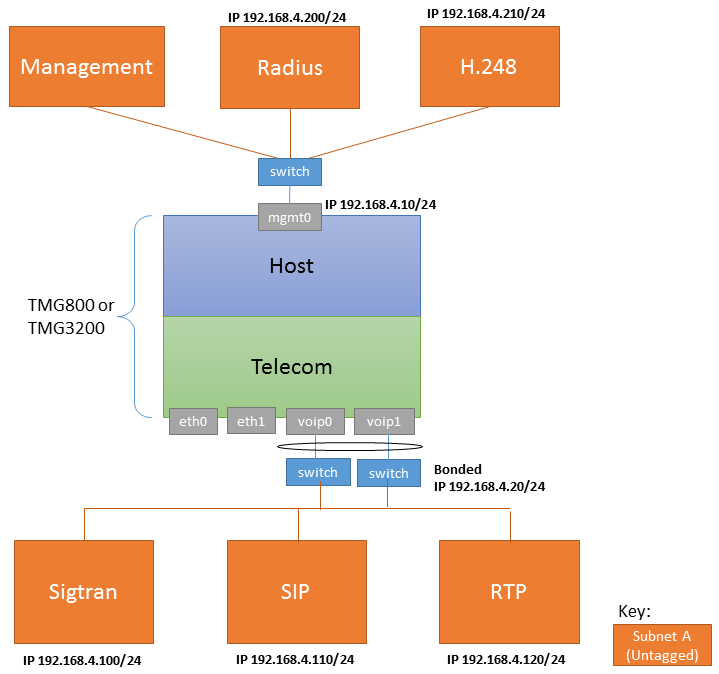
Local IPs Remote IPs

In this example, here are the IPs used:

  • Management on mgmt0: 192.168.4.10
  • VoIP on voip0/voip1 (bonded): 192.168.4.20
  • Radius server: 192.168.4.200
  • H.248 MGC: 192.168.4.210
  • Remote Sigtran endpoint IP: 192.168.4.100
  • Remote SIP endpoint IP: 192.168.4.110
  • Remote RTP endpoint IP: 192.168.4.120
Configure IP Network A Configure IP Network B
  • Subnet A is accessed through MGMT0
  • MGMT0 network interface modification requires the use of the tbchangeip shell script
  • Use tbchangeip with the following parameters:
    • IP Address: 192.168.4.10
    • Netmask: 255.255.255.0
    • Default gateway: 192.168.4.1


Subnet B is untagged and bonded over VOIP0 and VOIP1 ports.

  • Delete voip0 and voip1 virtual port
  • Create VP_VOIP virtual port:
    • Name: VP_VOIP
    • vLanId: Untagged
    • Physical Ports: voip0, voip1


  • Delete voip0 and voip1 IP Address
  • Create VOIP_ADDRESS IP Address:
    • Name: VOIP_ADDRESS
    • Virtual Ports: VP_VOIP
    • IP Address: 192.168.4.20
    • Netmask: 255.255.255.0
    • Services: RTP, SIP, SIGTRAN
Configure SIP Configure SIGTRAN Configure H.248 Configure RADIUS
  • Configure SIP
    • IP range parameters:
      • Name: PORT_RANGE_VOIP
      • IP Interface: VOIP_ADDRESS
      • Minimum Port: 20000
      • Maximum Port: 30000
    • SIP transport server parameters:
      • Port: 5060
      • IP Interface: VOIP_ADDRESS
    • SIP NAP parameters:
      • Proxy Address: 192.168.4.110
      • Port Range: PORT_RANGE_VOIP
  • When you Configure H.248, set the following:
    • Local IP Address and Public IP Address: 192.168.4.210

[Public IP or NAT public IP]

  • When you Configure RADIUS, set the following:
    • Source IP interface: Any
    • Radius -> Radius Server
    • Public IP Address: Empty