Use Cases: IP Network Configuration
| This article applies to: | Product | Version |
| Tmedia | 2.8, 2.9, 2.10, 3.0, 3.2 |
The following uses cases provide guideance for the most common IP network configurations using the Web Portal.
Select a use case to learn about its configuration.
| IP Network Configuration
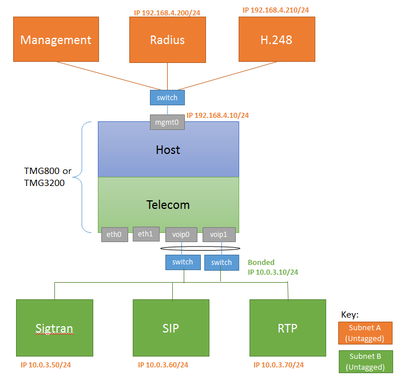
One subnet, Two IP Addresses, Untagged |
IP Network Configuration
Two subnets, One IP per subnet, untagged |
IP Network Configuration
Two VLAN, Three IP Addresses, tagged |
|---|---|---|
|
|
|
|


| IP Network Configuration
Two VLAN, Three IP Addresses, all through VoIP ports, tagged |
IP Network Configuration
Two tagged VLAN, Four IP Addresses, all through VoIP ports, SIP/RTP on separate IP |
IP Network Configuration
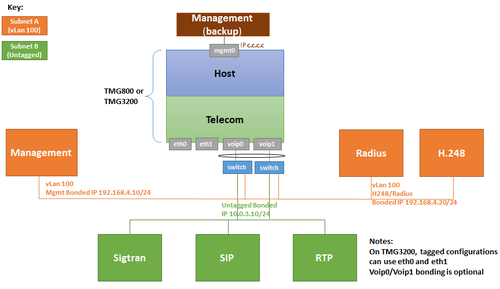
Two VLAN: tagged VLAN for management, radius and H.248, Untagged VLAN for SIP/RTP/Sigtran on separate IP, all through VoIP ports |
|---|---|---|
|
|
|
|

| IP Network Configuration
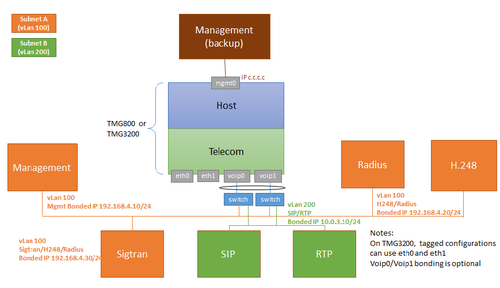
Two VLAN: tagged VLAN for management, sigtran, radius and H.248, Untagged subnet for SIP/RTP/ on separate IP, all through VoIP ports |
IP Network Configuration
Two VLAN: tagged VLAN for Sigtran, radius and H.248, Untagged VLAN for SIP/RTP on separate IP, all through VoIP ports, Management local only |
IP Network Configuration
Four VLAN: tagged VLAN 100 for management, VLAN 200 for SIP/RTP, VLAN 300 for Sigtran, VLAN 400 for Radius, all through VoIP ports |
|---|---|---|
|
|
|
|


| IP Network Configuration
Four VLAN: tagged VLAN 100 for management, VLAN 200 for Sigtran, VLAN 300 RTP, VLAN 400 for H.248, all through VoIP ports |
IP Network Configuration
One VLAN, One IP Addresses, all tagged traffic one IP (TMG800 only) |
IP Network Configuration
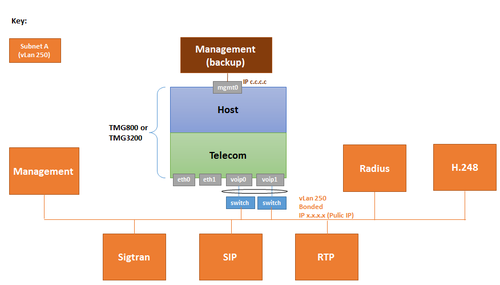
One IP Addresses except for management, all tagged traffic, local only (TMG800 only) |
|---|---|---|
|
|
 |
|


| IP Network Configuration
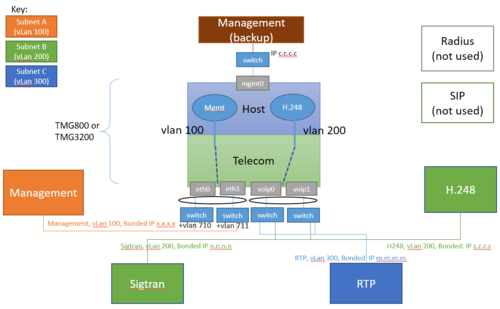
Three VLAN: VLAN 100 for management through ETH ports, VLAN 200 for Sigtran and H.248, VLAN 300 for RTP through VoIP ports |
|---|
|
|