ProSBC:CNAM Verification Robocall Analytics: Difference between revisions
Nicole Tan (talk | contribs) No edit summary |
Nicole Tan (talk | contribs) (NT: Added more steps for the routes and different scenarios:) |
||
| Line 78: | Line 78: | ||
*[[:File:Main_ClearIP.zip|Refer to Main_ClearIP.rb here to know what it should look like in your existing "main" script]] | *[[:File:Main_ClearIP.zip|Refer to Main_ClearIP.rb here to know what it should look like in your existing "main" script]] | ||
== | ==Add service_type in NAPs Column == | ||
NAPs Columns->Create New NAPs Column | |||
Name->service_type | |||
Type attributes -> NORMAL|AUTHENTICATION|VERIFICATION | |||
Default ->NORMAL | |||
**Set the value to be "AUTHENTICATION" for CLEARIP NAPs | |||
Below steps are for the scenario with only one ClearIP NAP without the need to differentiate Inbound and Outbound | |||
==Create Transport Server for ClearIP NAP == | |||
SIP -> Create New Transport Server | SIP -> Create New Transport Server | ||
Name-> | Name->SIP_TS_CLEARIP | ||
Port Type->TCP | Port Type->TCP | ||
Port->5060 | Port->5060 | ||
IP Interface-> Select the IP interface which can reach to ClearIP on the public network | IP Interface-> Select the IP interface which can reach to ClearIP on the public network | ||
== | ==Create ClearIP NAP == | ||
NAPs->Create New NAP | NAPs->Create New NAP | ||
Name->NAP_CLEARIP | Name->NAP_CLEARIP | ||
Proxy address->sip.clearip.com ( | SIP Transport Servers->SIP_TS_CLEARIP | ||
Proxy address->sip.clearip.com (Or appropriate Domain provided by ClearIP) | |||
Port range->[Select port range of IP interface above) | |||
==Set service_type to "AUTHENTICATION" for NAP_CLEARIP == | |||
NAP Columns -> select NAP_CLEARIP | |||
service_type: AUTHENTICATION | |||
== Add Route to NAP_CLEARIP == | |||
Routes -> Create New Route | |||
Name: To_ClearIP | |||
NAP: (Any) (or you can choose specific NAPs - you may need to create multiple routes in this case) | |||
Remapped NAP: NAP_CLEARIP | |||
Priority: 10 | |||
== | Below steps are for the scenario which require more than one ClearIP NAP to differentiate Inbound and Outbound | ||
NAPs | ==Create 2 TCP transport servers: one for inbound and one for outbound == | ||
Name-> | SIP -> Create New Transport Server | ||
Name->SIP_TS_CLEARIP_IN | |||
Port Type->TCP | |||
Port->5060 | |||
IP Interface-> Select the IP interface which can reach to ClearIP on the public network | |||
SIP -> Create New Transport Server | |||
Name->SIP_TS_CLEARIP_OUT | |||
Port Type->TCP | |||
Port->5060 | |||
IP Interface-> Select the IP interface which can reach to ClearIP on the public network | |||
==Create Inbound ClearIP NAP and Outbound ClearIP NAP == | |||
NAPs->Create New NAP | |||
Name->NAP_CLEARIP_IN | |||
SIP Transport Servers->SIP_TS_CLEARIP_IN | |||
Proxy address->sip.clearip.com (Or appropriate Domain provided by ClearIP) | |||
Port range->[Select port range of IP interface above) | |||
NAPs->Create New NAP | |||
Name->NAP_CLEARIP_OUT | |||
SIP Transport Servers->SIP_TS_CLEARIP_OUT | |||
Proxy address->sip.clearip.com (Or appropriate Domain provided by ClearIP) | |||
Port range->[Select port range of IP interface above) | |||
==Set service_type to "AUTHENTICATION" for NAP_CLEARIP_IN and NAP_CLEARIP_OUT == | |||
NAP Columns -> select NAP_CLEARIP_IN | |||
service_type: AUTHENTICATION | |||
NAP Columns -> select NAP_CLEARIP_OUT | |||
service_type: AUTHENTICATION | |||
== | == Add Routes to NAP_CLEARIP_IN and NAP_CLEARIP_OUT == | ||
Routes -> Create New Route | |||
Name: To_ClearIP_IN | |||
NAP: specific NAPs which carry the inbound traffic | |||
Remapped NAP: NAP_CLEARIP_IN | |||
Priority: 10 | |||
Routes -> Create New Route | |||
Name: To_ClearIP_IN | |||
NAP: specific NAPs which carry the outbound traffic | |||
Remapped NAP: NAP_CLEARIP_OUT | |||
Priority: 10 | |||
==Configure other Routes== | |||
You need to configure other routes after the ClearIP routes if you want ProSBC to perform route advances upon receiving 503 or 302. | |||
Check the below link for the detail instruction to create static routes: | Check the below link for the detail instruction to create static routes: | ||
https://docs.telcobridges.com/tbwiki/Toolpack:Creating_a_First_Call_Route_E | https://docs.telcobridges.com/tbwiki/Toolpack:Creating_a_First_Call_Route_E | ||
| Line 106: | Line 163: | ||
https://docs.telcobridges.com/tbwiki/Toolpack:Tsbc_Call_Routes_Settings_3.1#Label_Routing | https://docs.telcobridges.com/tbwiki/Toolpack:Tsbc_Call_Routes_Settings_3.1#Label_Routing | ||
==Configure Route Retry Action== | ==Configure Route Retry Action for the related Reason Cause Code== | ||
Route retry action of 3xx, 404 and 603 must be configured to allow ProSBC to perform failover, fraud control and SHAKEN AS/VS request. | Route retry action of 3xx, 404 and 603 must be configured to allow ProSBC to perform failover, fraud control and SHAKEN AS/VS request. | ||
Profiles->Edit Reason Cause Mapping | Profiles->Edit Reason Cause Mapping | ||
Revision as of 15:29, 24 September 2021
Introduction
This document provides instructions to configure ProSBC to operate with the TransNexus/ClearIP server for Verification with CNAM and Robocall Analytics.
TransNexus/ClearIP is a SIP redirect server that provides advanced Least Cost Routing (LCR), fraud control and STIR (Secure Telephony Identity Revisited) / SHAKEN (Secure Handling of Asserted information using toKENs) features.
ProSBC 3.0.90 or a later version is needed to support Verification with CNAM and Robocall Analytics with TransNexus.
- For simple Robocall Mitigation, please check the instruction here: https://docs.telcobridges.com/tbwiki/ProSBC:Robocall_Mitigation
Typical Call Scenarios
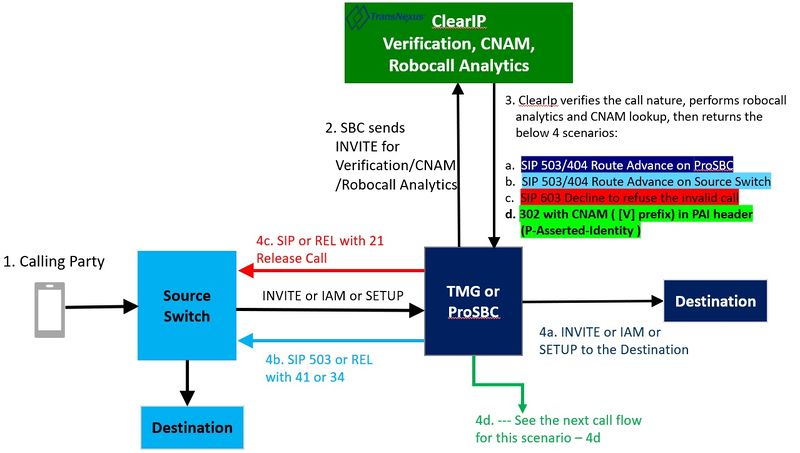
This section provides the simplified network diagram with typical call flows.
Network Diagram


Typical Call Flows
1. Source of ServiceProvider sends a call to ProSBC.
2. ProSBC forwards the call to ClearIP for Verification with CNAM and Robocall Analytics
3. ClearIP performs Verification, CNAM lookup, Robocall Analytics, then sends one of the following responses to ProSBC
- 3a. SIP 404 Not Found: No fraud is detected, not a robocall.
- 3b. SIP 503 Service unavailable: No fraud is detected, not a robocall.
- 4c. SIP 603 Decline: Fraud is detected, block the call.
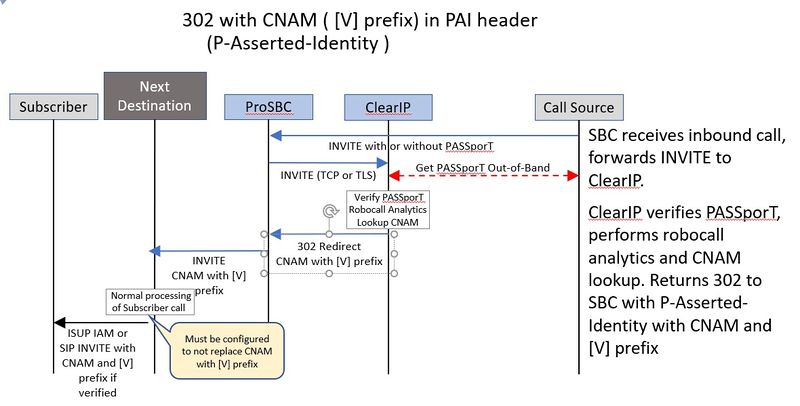
- 4d. SIP 302 with CNAM ( [V] prefix) in PAI header (P-Asserted-Identity )
4. Upon receiving 404 or 503
    4a: - ProSBC returns SIP 503 (or mapping to the TDM cause code) to the Source switch to perform route advance
    Call Source (TDM or SIP) --------Invite or SETUP or IAM ---------> ProSBC/TMG ----Invite--> ClearIP
    Call Source (TDM or SIP) <---SIP 503 or REL with 41 or 34 -------- ProSBC/TMG < ----503---- ClearIP
    4b: - ProSBC route advances on SIP 503 and sends call to next destination, does not return response to the Source switch
    Call Source (TDM or SIP) ---Invite or SETUP or IAM ---> ProSBC/TMG ----Invite--> ClearIP
                                                            ProSBC/TMG < ----503---- ClearIP
                                                            ProSBC/TMG  ----Invite---Next Routes
Upon receiving 603
  4c: ProSBC returns SIP 603 (or mapping to the TDM cause code) to the Source switch, then release the call
   Call Source (TDM or SIP) -----Invite or SETUP or IAM ------> ProSBC/TMG ----Invite--> ClearIP
   Call Source (TDM or SIP) <---SIP 603 or REL with 21 -------- ProSBC/TMG < ----603---- ClearIP
Upon receiving 302
  4c: ProSBC extracts the CNAM ([V] prefix)) in the PAI header of the 302, and pass it to the next destination (NAP) according to the Routes priority order
   Call Source (TDM or SIP) ---Invite or SETUP or IAM ---> ProSBC/TMG ----Invite--> ClearIP
                                                           ProSBC/TMG < ----302---- ClearIP
                                                           ProSBC/TMG  ----Invite with CNAM ([V] prefix)) ---Next Routes
ProSBC Configuration
This section provides ProSBC configuration for the solution.
Configure Routing Script
ProSBC is configured to use routing script to send some SIP headers to ClearIP to identify the source of the call.
- 1. Enable routing script
Gateway->Use script: choose the right main script
- 2. Load routing scripts
- Import the filter script:
Gateway->Routes->Routing Script->Import Script File
   File->ClearIP_Query.rb
   ScriptType->filter
   Load on startup->checked
- Include the filter script to the main script, default is simple_routing_sbc.rb.
Note: Only one "main" script should be shown the set of the Scripts:
Gateway->Routes->Routing Script->Edit the main script:

- Add the "require 'ClearIP_Query' unless defined?(ClearIPQuery)" statement at the top of the main script.
- Add the "include ClearIPQuery" statement in the main routing class.
- Add the filter "  before_filter :method => :ClearIP_query" in the main routing class.
- Note: if label routing or other before_filter script are used, please place ClearIP_query last
- Refer to Main_ClearIP.rb here to know what it should look like in your existing "main" script
Add service_type in NAPs Column
NAPs Columns->Create New NAPs Column
    Name->service_type
    Type attributes -> NORMAL|AUTHENTICATION|VERIFICATION
    Default ->NORMAL
**Set the value to be "AUTHENTICATION" for CLEARIP NAPs
Below steps are for the scenario with only one ClearIP NAP without the need to differentiate Inbound and Outbound
Create Transport Server for ClearIP NAP
 SIP -> Create New Transport Server
    Name->SIP_TS_CLEARIP
    Port Type->TCP
    Port->5060
    IP Interface-> Select the IP interface which can reach to ClearIP on the public network
Create ClearIP NAP
NAPs->Create New NAP
    Name->NAP_CLEARIP
    SIP Transport Servers->SIP_TS_CLEARIP
    Proxy address->sip.clearip.com (Or appropriate Domain provided by ClearIP)
    Port range->[Select port range of IP interface above)
Set service_type to "AUTHENTICATION" for NAP_CLEARIP
NAP Columns -> select NAP_CLEARIP
service_type: AUTHENTICATION
Add Route to NAP_CLEARIP
Routes -> Create New Route
Name: To_ClearIP
NAP: (Any)  (or you can choose specific NAPs - you may need to create multiple routes in this case)
Remapped NAP: NAP_CLEARIP
Priority: 10
Below steps are for the scenario which require more than one ClearIP NAP to differentiate Inbound and Outbound
Create 2 TCP transport servers: one for inbound and one for outbound
 SIP -> Create New Transport Server
    Name->SIP_TS_CLEARIP_IN
    Port Type->TCP
    Port->5060
    IP Interface-> Select the IP interface which can reach to ClearIP on the public network

 SIP -> Create New Transport Server
    Name->SIP_TS_CLEARIP_OUT
    Port Type->TCP
    Port->5060
    IP Interface-> Select the IP interface which can reach to ClearIP on the public network
Create Inbound ClearIP NAP and Outbound ClearIP NAP
NAPs->Create New NAP
    Name->NAP_CLEARIP_IN
    SIP Transport Servers->SIP_TS_CLEARIP_IN
    Proxy address->sip.clearip.com (Or appropriate Domain provided by ClearIP)
    Port range->[Select port range of IP interface above)
NAPs->Create New NAP
    Name->NAP_CLEARIP_OUT
    SIP Transport Servers->SIP_TS_CLEARIP_OUT
    Proxy address->sip.clearip.com (Or appropriate Domain provided by ClearIP)
    Port range->[Select port range of IP interface above)
Set service_type to "AUTHENTICATION" for NAP_CLEARIP_IN and NAP_CLEARIP_OUT
NAP Columns -> select NAP_CLEARIP_IN
service_type: AUTHENTICATION
NAP Columns -> select NAP_CLEARIP_OUT
service_type: AUTHENTICATION
Add Routes to NAP_CLEARIP_IN and NAP_CLEARIP_OUT
Routes -> Create New Route
Name: To_ClearIP_IN
NAP: specific NAPs which carry the inbound traffic
Remapped NAP: NAP_CLEARIP_IN
Priority: 10
Routes -> Create New Route
Name: To_ClearIP_IN
NAP: specific NAPs which carry the outbound traffic
Remapped NAP: NAP_CLEARIP_OUT
Priority: 10
Configure other Routes
You need to configure other routes after the ClearIP routes if you want ProSBC to perform route advances upon receiving 503 or 302.
 Check the below link for the detail instruction to create static routes:
 https://docs.telcobridges.com/tbwiki/Toolpack:Creating_a_First_Call_Route_E
 It could also combine with other Routeset routing:
 https://docs.telcobridges.com/tbwiki/Toolpack:Tsbc_Call_Routes_Settings_3.1#Label_Routing
Route retry action of 3xx, 404 and 603 must be configured to allow ProSBC to perform failover, fraud control and SHAKEN AS/VS request.
Profiles->Edit Reason Cause Mapping
    404 Not found->Route retry action->Continue call
    503 Service unavailable->Route retry action->Continue call
    603 Decline->Route retry action->Stop call
    302 Moved Temporarily-> Route retry action: Process call routing
Notes:
- The default route retry action of 404 is Stop call.
- The default route retry action of 603 is Continue call.