|
|
| Line 14: |
Line 14: |
|
| |
|
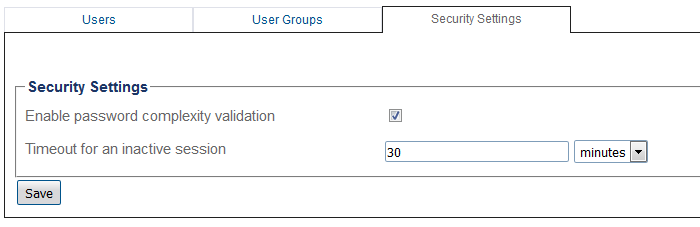
| [[Image:Users_Security_Settings_A.png]] | | [[Image:Users_Security_Settings_A.png]] |
|
| |
| <br/><br/>
| |
| <div class="mw-collapsible mw-collapsed" data-collapsetext="Northbound Interface" data-expandtext="Northbound Interface" style="width: 400px;">
| |
|
| |
| '''Path'''
| |
| <pre>
| |
| /user_security_settings/general_security_settings
| |
| </pre>
| |
|
| |
| '''Parameters (text)'''
| |
| <pre>
| |
| /user_security_settings/general_security_settings
| |
| inactive_session_timeout : "30 minutes"
| |
| password_complexity_enabled : true
| |
| </pre>
| |
|
| |
| '''Parameters (json)'''
| |
| <pre>
| |
| {
| |
| "inactive_session_timeout" : "30 minutes",
| |
| "password_complexity_enabled" : true
| |
| }
| |
| </pre>
| |
| </div>
| |
|
| |
|
| ==List of Parameters== | | ==List of Parameters== |
Revision as of 10:44, 24 April 2019
Applies to version v3.1
To modify the security settings:
1- Click Web Users in the navigation panel.

2- Select the Security Settings tab, and modify the desired setting.
List of Parameters

