Use Cases:Network Configuration A: Difference between revisions
No edit summary |
|||
| Line 15: | Line 15: | ||
! width="200" style="background: none repeat scroll 0% 0% rgb(239, 239, 239); -moz-background-inline-policy: continuous;" | IP Network Configuration | ! width="200" style="background: none repeat scroll 0% 0% rgb(239, 239, 239); -moz-background-inline-policy: continuous;" | IP Network Configuration | ||
Two VLAN, Three IP Addresses, tagged | Two VLAN, Three IP Addresses, tagged | ||
! width="200" style="background: none repeat scroll 0% 0% rgb(239, 239, 239); -moz-background-inline-policy: continuous;" | IP Network Configuration | |||
Two VLAN, Three IP Addresses, all through VoIP ports, tagged | |||
|- | |- | ||
| valign="top" | | | valign="top" | | ||
| Line 22: | Line 24: | ||
| valign="top" | | | valign="top" | | ||
[[File:UseCase_TwoVlandsThreeIpsVoipAndManagementPortsUsed_0.png|link=Use_Cases:Network_Configuration_IP_UseCase3_A|400px]] | [[File:UseCase_TwoVlandsThreeIpsVoipAndManagementPortsUsed_0.png|link=Use_Cases:Network_Configuration_IP_UseCase3_A|400px]] | ||
| valign="top" | | |||
[[File:UseCase_TwoVlansThreeIpsVoipPortsTagged_0.png|link=Use_Cases:Network_Configuration_IP_UseCase3_B|400px]] | |||
|} | |} | ||
Revision as of 03:13, 23 September 2016
Applies to version(s): v2.8, v.2.9.
The following uses cases provide guideance for the most common IP network configurations using the Web Portal.
Select a use case to learn about its configuration.
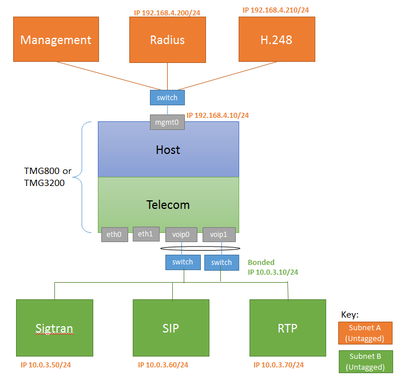
| IP Network Configuration
One subnet, Two IP Addresses, Untagged |
IP Network Configuration
Two subnets, One IP per subnet, untagged |
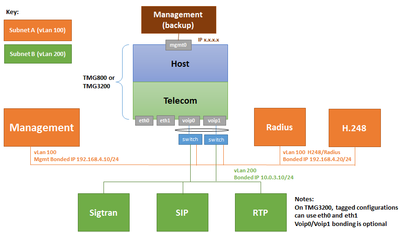
IP Network Configuration
Two VLAN, Three IP Addresses, tagged |
IP Network Configuration
Two VLAN, Three IP Addresses, all through VoIP ports, tagged |
|---|---|---|---|
|
|
|
|
|