|
|
| Line 20: |
Line 20: |
| | | | | |
| Subnet B is untagged and bonded over VOIP0 and VOIP1 ports. | | Subnet B is untagged and bonded over VOIP0 and VOIP1 ports. |
| *[[Create Virtual Port]] | | *[[Create Virtual Port]] When configuring the virtual port, configure it as follows: |
| | **Name: vp VOIP U |
| | **vLanId: Untagged |
| | **Physical Ports: voip0, voip1 |
| | |
| *[[Create IP Address]] | | *[[Create IP Address]] |
| |- | | |- |
Revision as of 15:33, 23 April 2015
Applies to version(s): v2.8.
This article provides the steps required to complete the most common IP network configurations using the Web Portal.
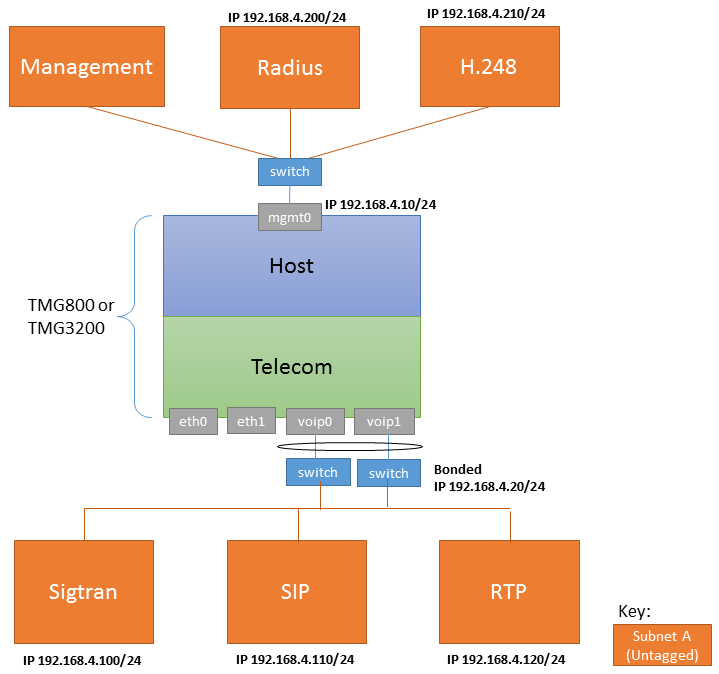
One subnet, Two IP Addresses, Untagged
| Configure IP Network A
|
Configure IP Network B
|
|
Subnet A uses the MGMT0 network interface; because it is untagged its IP can only be configured with the tbchangeip command on the SSH port.
|
Subnet B is untagged and bonded over VOIP0 and VOIP1 ports.
- Create Virtual Port When configuring the virtual port, configure it as follows:
- Name: vp VOIP U
- vLanId: Untagged
- Physical Ports: voip0, voip1
|
| Configure SIP
|
Configure SIGTRAN
|
Configure H.248
|
Configure RADIUS
|
|
|
|
|
|
|
Two subnets, One IP per subnet, untagged
[image of network configuration 2]
| Configure IP Network A
|
Configure IP Network B
|
|
Subnet A uses the MGMT0 network interface; because it is untagged its IP can only be configured with the tbchangeip command on the SSH port.
|
Subnet B is untagged and is bonded over VOIP0 and VOIP1 ports.
|
| Configure SIP
|
Configure SIGTRAN
|
Configure H.248
|
Configure RADIUS
|
|
|
|
|
|
|
Two VLAN, Three IP Address, tagged
[image of network configuration 3]
| Configure IP Network A
|
Configure IP Network B
|
|
|
Subnet B uses untag bonded over VOIP0 and VOIP1 ports
|
| Configure SIP
|
Configure SIGTRAN
|
Configure H.248
|
Configure RADIUS
|
|
|
|
|
|
|
