|
|
| Line 2: |
Line 2: |
| {{DISPLAYTITLE:Configuring Lawful Interception}} | | {{DISPLAYTITLE:Configuring Lawful Interception}} |
|
| |
|
| Lawful Interception is configured by the following steps:
| | '''To configure a Law Enforcement Agency:''' |
| | |
| # Configuring a Law Enforcement Agency and it's parameters
| |
| # Creating a NAP that is connected to the Law Enforcement Agency
| |
| # Providing a list of targets to intercept (through a coma-separate-values .csv file)
| |
| # Enabling the Lawful Intercept routing script filter
| |
| # Exchanging SSH public/private keys with server to allow password-less SFTP
| |
| | |
| ==To configure a Law Enforcement Agency and it's parameters==
| |
|
| |
|
| 1- Select '''Lawful Interception''' from the navigation panel | | 1- Select '''Lawful Interception''' from the navigation panel |
| Line 24: |
Line 16: |
| * NWO (Network Operator) Identifier: An internationally unique identifier that represents the network operator, access provider or service provider using the [[Tmedia]] equipment | | * NWO (Network Operator) Identifier: An internationally unique identifier that represents the network operator, access provider or service provider using the [[Tmedia]] equipment |
|
| |
|
| == Law Enforcement Agency parameters ==
| | |
| Multiple Law Enforcement Agencies can be created in [[Toolpack]]. Each operates independently of others, and can intercept the same calls, as well as different ones. | | Multiple Law Enforcement Agencies can be created in [[Toolpack]]. Each operates independently of others, and can intercept the same calls, as well as different ones. |
|
| |
|
| Line 70: |
Line 62: |
|
| |
|
| [[Image:file_db_selection_shot.PNG]] | | [[Image:file_db_selection_shot.PNG]] |
|
| |
| == Format Lawful Intercept Targets configuration files (.csv) ==
| |
| The Lawful Intercept Targets configuration files must be formatted in .csv (coma-separated values) format. The following columns must be present:
| |
| * liid: Text string that uniquely identifies the target to intercept. This ID will be provided with each outgoing call on interception NAP to the Law Enforcement Agency, and in each IRI record uploaded to the FTP/SFTP server.
| |
| * number: The phone number of the target to intercept. Any call with this number as the calling, or the called number, will be intercepted.
| |
| * start: (optional) Starting date/time from which the interception can take place. Calls made before that date from/to the target won't be intercepted.
| |
| * end: (optional) End date/time where this target interception ends. Calls made after that date from/to the target won't be intercepted.
| |
|
| |
| '''*** Warning: The column names are case sensitive'''
| |
|
| |
| Example:
| |
| liid,number,start,end
| |
| John Smith,5550001,2012-10-24T00:00:00-05:00,2012-10-24T23:59:59-05:00
| |
| Joe Dalton,14503333007,2012-01-01T00:00:00-05:00,2012-12-31T23:59:59-05:00
| |
|
| |
| = Enabling the Lawful Intercept routing script filter =
| |
| Interpretation of the Lawful Intercept Targets configuration files (.csv) is done by a routing script filter, that can easily be added to any existing routing script used by the [[Toolpack]] system.
| |
|
| |
| Documentation on routing script can be found here: [[Scriptable_Routing_Engine|Scriptable Routing Engine]]
| |
|
| |
| == Installing missing ruby 'gem' ==
| |
| The Lawful Intercept filter script requires the 'json' ruby gem.
| |
| TMedia units ([[TMG800]], [[TMG3200]], [[TMG7800]]) provided by TelcoBridges are now shipped with that 'gem' already installed.
| |
|
| |
| If you have an older TMedia, or if you are using your own host, please validate that the host has the 'json' gem already installed:
| |
| gem list --local
| |
|
| |
| In case it's missing, you can install it from a shell:
| |
| gem install json
| |
|
| |
| == Including the Lawful Intercept filter script ==
| |
| The Lawful Intercept filter is activated by:
| |
| * Including the 'Lawful intercept' module in your routing script: '''''require 'base_routing''''''
| |
| * Include the LawfulIntercept class: '''''include LawfulIntercept'''''
| |
| * Add the Lawful Intercept "after_filter" to your script: '''''after_filter :method => :enable_lawful_intercept'''''
| |
|
| |
| == Example script ==
| |
| Here is an example "simple routing" script that enables Lawful Intercept:
| |
|
| |
| require 'base_routing'
| |
|
| |
| # Insert following line ===================>
| |
| require 'lawful_intercept'
| |
|
| |
| class SimpleRouting < BaseRouting
| |
| # Insert following line ===================>
| |
| include LawfulIntercept
| |
|
| |
| route_match :call_field_name => :called
| |
| route_match :call_field_name => :calling
| |
| route_match :call_field_name => :nap
| |
| route_remap :call_field_name => :called, :route_field_name => :remapped_called
| |
| route_remap :call_field_name => :calling, :route_field_name => :remapped_calling
| |
| route_remap :call_field_name => :nap, :route_field_name => :remapped_nap
| |
|
| |
| # Insert following line ===================>
| |
| after_filter :method => :enable_lawful_intercept
| |
| end
| |
|
| |
| @@routing = SimpleRouting.new
| |
|
| |
| def init_routes( routes )
| |
| @@routing.init routes
| |
| end
| |
|
| |
| def route( call, nap_list )
| |
| @@routing.route call, nap_list
| |
| end
| |
|
| |
| = Exchanging SSH public/private keys with server to allow password-less SFTP =
| |
| Toolpack can use the secure FTP (SFTP) protocol to upload IRI records to a remote server.
| |
|
| |
| Please read the following documentation:
| |
| *[[configuring_lawful_interception_ssh|Configure IRI (Intercept Related Information) records for SFTP upload]]
| |
|
| |
|
| |
| [[category:Needs revising]]
| |
Applies to version(s): v2.7
To configure a Law Enforcement Agency:
1- Select Lawful Interception from the navigation panel
This page contains global Lawful Intercept parameters, and a list of Law Enforcement Agencies.

Available parameter:
- NWO (Network Operator) Identifier: An internationally unique identifier that represents the network operator, access provider or service provider using the Tmedia equipment
Multiple Law Enforcement Agencies can be created in Toolpack. Each operates independently of others, and can intercept the same calls, as well as different ones.
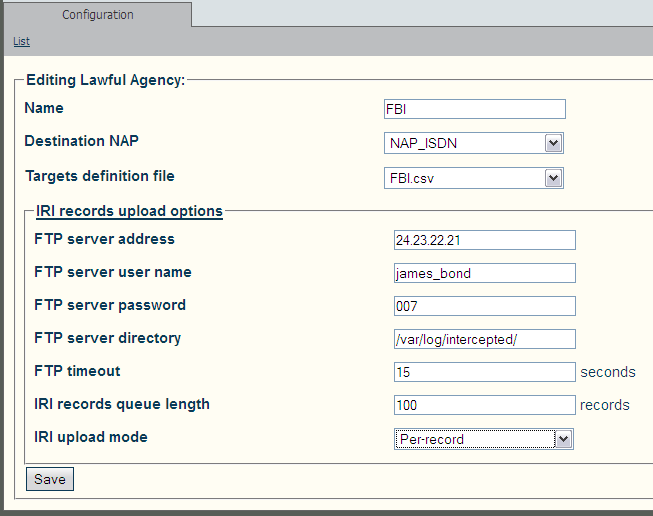
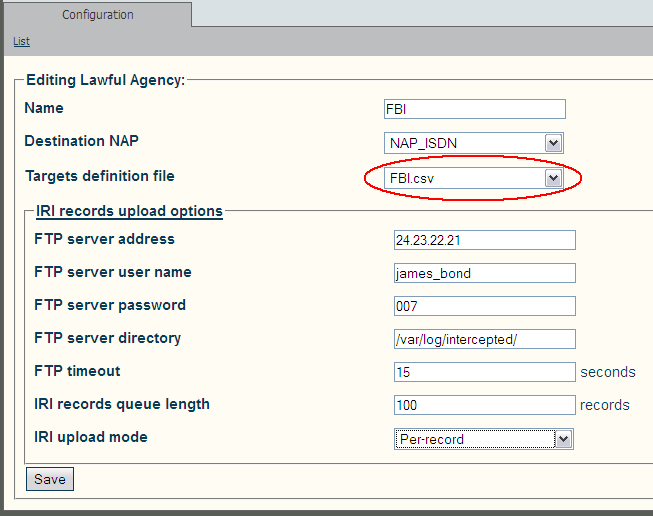
Each Law Enforcement Agency has the following parameters:
- Name
- .csv file that contains the list of targets to intercept
- NAP to use for making outgoing calls to Law Enforcement Agencies, carrying audio for intercepted call legs
- Configuration of FTP/SFTP client for uploading IRI (Intercept Related Information) records to Law Enforcement Agency's FTP or SFTP server:
- IP address or domain name of the FTP/SFTP server
- User name to use for FTP/SFTP server login
- Password to use for FTP/SFTP server login
- Remote directory to store IRI records into
- FTP/SFTP connection timeout
- Maximum number of IRI entries in the upload queue
- Maximum time a IRI entry can remain in the upload queue
Creating a NAP that is connected to a Law Enforcement Agency
Create a NAP in the same way that is normally done using Toolpack. The ETSI specifications refer to ISDN NAP, but other type of NAPs are also supported by TelcoBridges. This NAP must be connected to the Law Enforcement Agency that will receive the intercepted calls.
Documentation on NAPs creation can be found here: Creating a NAP
Providing a list of targets to intercept (through a coma-separate-values .csv file)
Uploading/Modifying Lawful Intercept Targets Configuration Files (.csv)
The list of targets to intercept is provided as a .csv file. Each configured Law Enforcement Agency points to it's own .csv file.
The .csv file is uploaded from the Web Portal:
1- Click File Db in the navigation panel
2- Edit one of the listed File Db, or click reate New File Db to create a new one
3- In the Lawful Intercept Targets, section click Import (to create a new file) or Update (to modify one of the existing files)
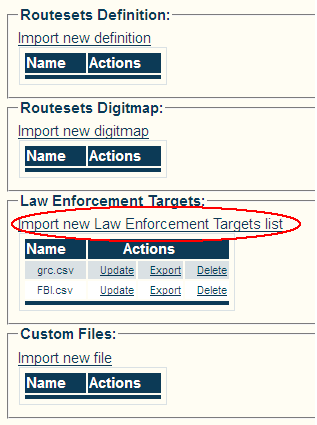
4- To activate a .csv file:
- Click Lawful Interception in the navigation panel.
- Select the .csv file in the appropriate Law Enforcement Agency's configuration page.