|
|
| (5 intermediate revisions by 2 users not shown) |
| Line 1: |
Line 1: |
| === '''''Applies to version(s): v2.8.''''' ===
| | {{DISPLAYTITLE:IP Network Configuration Use Case:Two VLAN, Three IP Addresses, tagged}} |
| {{DISPLAYTITLE:Use Cases:Network Configuration}} | | {| class="wikitable" |
| __TOC__
| |
| | |
| The following uses cases provide guideance for the most common IP network configurations using the Web Portal:
| |
| | |
| * [[Use_Cases:Network_Configuration_IP_UseCase1_A|IP Network Configuration:One subnet, Two IP Addresses, Untagged]]
| |
| * [[Use_Cases:Network_Configuration_IP_UseCase2_A|IP Network Configuration:Two subnets, One IP per subnet, untagged ]]
| |
| * [[Use_Cases:Network_Configuration_IP_UseCase3_A|IP Network Configuration:Two VLAN, Three IP Addresses, tagged]]
| |
| | |
| == One subnet, Two IP Addresses, Untagged ==
| |
| | |
| [[File:UseCase_OneSubTwoIpUntagged_0.png]]
| |
| | |
| {|
| |
| |STYLE="vertical-align: top"|
| |
| {| border="1" class="wikitable" | |
| ! width="500" style="background: none repeat scroll 0% 0% rgb(0, 83, 139);" | Configure IP Network A
| |
| ! width="500" style="background: none repeat scroll 0% 0% rgb(0, 83, 139);" | Configure IP Network B
| |
| |-
| |
| |
| |
| *Subnet A is accessed through MGMT0
| |
| *MGMT0 network interface modification requires the use of the tbchangeip shell script
| |
| *Use [[TMG:Change_Management_IP_Address#Modify_static_IP_address|tbchangeip]] with the following parameters:
| |
| **'''IP Address''': 192.168.4.10
| |
| **'''Netmask''': 255.255.255.0
| |
| **'''Default gateway''': 192.168.4.1
| |
| | |
| | |
| |
| |
| Subnet B is untagged and bonded over VOIP0 and VOIP1 ports.
| |
| | |
| *Delete voip0 and voip1 virtual port
| |
| *Create [[Toolpack:Configuring_Virtual_Port A|VP_VOIP virtual port]]:
| |
| **'''Name''': VP_VOIP
| |
| **'''vLanId''': Untagged
| |
| **'''Physical Ports''': voip0, voip1
| |
| | |
| | |
| *Delete voip0 and voip1 IP Address
| |
| *Create [[Toolpack:Configuring_VoIP_Interfaces C|VOIP_ADDRESS IP Address]]:
| |
| **'''Name''': VOIP_ADDRESS
| |
| **'''Virtual Ports''': VP_VOIP
| |
| **'''IP Address''': 192.168.4.20
| |
| **'''Netmask''': 255.255.255.0
| |
| **'''Services''': RTP, SIP, SIGTRAN
| |
| | |
| |- | | |- |
| |} | | |rowspan="2"|This article applies to: |
| {| colspan="4" border="1" class="wikitable"
| | |'''Product''' |
| ! width="250" style="background: none repeat scroll 0% 0% rgb(0, 83, 139);" | Configure SIP
| | |'''Version''' |
| ! width="250" style="background: none repeat scroll 0% 0% rgb(0, 83, 139);" | Configure SIGTRAN
| |
| ! width="250" style="background: none repeat scroll 0% 0% rgb(0, 83, 139);" | Configure H.248
| |
| ! width="250" style="background: none repeat scroll 0% 0% rgb(0, 83, 139);" | Configure RADIUS
| |
| |- | | |- |
| | | | |Tmedia |
| *[[Toolpack:Protocol_Stack_Settings_A#SIP|Configure SIP]]
| | |2.8, 2.9, 2.10, 3.0, 3.2 |
| **IP range parameters:
| |
| ***'''Name''': PORT_RANGE_VOIP
| |
| ***'''IP Interface''': VOIP_ADDRESS
| |
| ***'''Minimum Port''': 20000
| |
| ***'''Maximum Port''': 30000
| |
| **SIP transport server parameters:
| |
| ***'''Port''': 5060
| |
| ***'''IP Interface''': VOIP_ADDRESS
| |
| **SIP NAP parameters:
| |
| ***'''Proxy Address''': 192.168.4.110
| |
| ***'''Port Range''': PORT_RANGE_VOIP
| |
| |
| |
| *[[Toolpack:Protocol_Stack_Settings_A#SS7_ISUP|Configure SIGTRAN]]
| |
| |
| |
| *When you [[Toolpack:Protocol_Stack_Settings_A#H.248 MEGACO|Configure H.248]], set the following:
| |
| **'''Local IP Address and Public IP Address''': 192.168.4.210
| |
| [Public IP or NAT public IP]
| |
| | |
| |
| |
| *When you [[Toolpack:CDR_Settings_A|Configure RADIUS]], set the following:
| |
| **'''Source IP interface''': Any
| |
| **'''Radius -> Radius Server'''
| |
| **'''Public IP Address''': Empty
| |
| |}
| |
| |}
| |
| | |
| == Two subnets, One IP per subnet, untagged ==
| |
| | |
| | |
| [[File:UseCase_TwoSubnetsTwoIpsUntagged_0.png]]
| |
| | |
| | |
| {|
| |
| |STYLE="vertical-align: top"|
| |
| {| cellpadding="5" border="1" class="wikitable"
| |
| ! width="420" style="background: none repeat scroll 0% 0% rgb(0, 83, 139);" | Configure IP Network A
| |
| ! width="420" style="background: none repeat scroll 0% 0% rgb(0, 83, 139);" | Configure IP Network B
| |
| |-
| |
| |
| |
| | |
| *Subnet A is accessed through MGMT0
| |
| *MGMT0 network interface modification requires the use of the tbchangeip shell script
| |
| *Use [[TMG:Change_Management_IP_Address#Modify_static_IP_address|tbchangeip]] with the following parameters:
| |
| **'''IP Address''': 192.168.4.10
| |
| **'''Netmask''': 255.255.255.0
| |
| **'''Default gateway''': 192.168.4.1
| |
| | |
| |
| |
| Subnet B is untagged and bonded over VOIP0 and VOIP1 ports.
| |
| | |
| *Delete voip0 and voip1 virtual port
| |
| *Create [[Toolpack:Configuring_Virtual_Port A|VP_VOIP virtual port]]:
| |
| **'''Name''': VOIP_UNTAG
| |
| **'''vLanId''': Untagged
| |
| **'''Physical Ports''': voip0, voip1
| |
| | |
| *Delete voip0 and voip1 IP Address
| |
| *Create [[Toolpack:Configuring_VoIP_Interfaces C|VOIP_ADDRESS IP Address]]:
| |
| **'''Name''': VOIP_ADDRESS
| |
| **'''Virtual Ports''': VP_VOIP
| |
| **'''IP Address''': 10.0.3.10 bonded
| |
| **'''Netmask''': 255.255.255.0
| |
| **'''Services''': RTP, SIP, SIGTRAN
| |
| |-
| |
| |}
| |
| {| cellpadding="5" border="1" class="wikitable"
| |
| ! width="210" style="background: none repeat scroll 0% 0% rgb(0, 83, 139);" | Configure SIP
| |
| ! width="210" style="background: none repeat scroll 0% 0% rgb(0, 83, 139);" | Configure SIGTRAN
| |
| ! width="210" style="background: none repeat scroll 0% 0% rgb(0, 83, 139);" | Configure H.248
| |
| ! width="210" style="background: none repeat scroll 0% 0% rgb(0, 83, 139);" | Configure RADIUS
| |
| |-
| |
| |
| |
| *[[Toolpack:Protocol_Stack_Settings_A#SIP|Configure SIP]]
| |
| **IP range parameters:
| |
| ***'''Name''': PORT_RANGE_VOIP
| |
| ***'''IP Interface''': VOIP_ADDRESS
| |
| ***'''Minimum Port''': 20000
| |
| ***'''Maximum Port''': 30000
| |
| **SIP transport server parameters:
| |
| ***'''Port''': 5060
| |
| ***'''IP Interface''': VOIP_ADDRESS
| |
| **SIP NAP parameters:
| |
| ***'''Proxy Address''': 192.168.4.110
| |
| ***'''Port Range''': PORT_RANGE_VOIP
| |
| | |
| |
| |
| *[[Toolpack:Protocol_Stack_Settings_A#SS7_ISUP|Configure SIGTRAN]]
| |
| |
| |
| *When you [[Toolpack:Protocol_Stack_Settings_A#H.248 MEGACO|Configure H.248]], set the following:
| |
| **'''Local IP Address and Public IP Address''': 192.168.4.210
| |
| [Public IP or NAT public IP]
| |
| |
| |
| *When you [[Toolpack:CDR_Settings_A|Configure RADIUS]], set the following:
| |
| **'''Source IP interface''': Any
| |
| **'''Radius -> Radius Server'''
| |
| **'''Public IP Address''': Empty
| |
| |}
| |
| |} | | |} |
|
| |
|
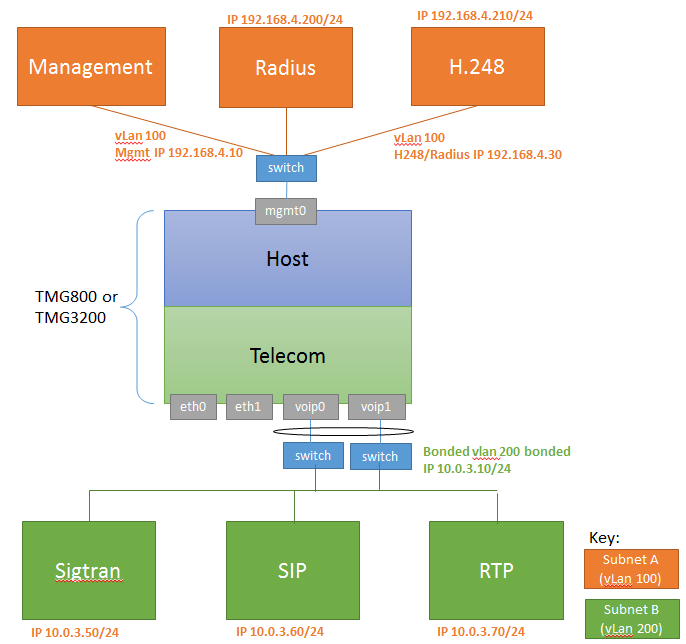
| == Two VLAN, Three IP Addresses, tagged == | | == Two VLAN, Three IP Addresses, tagged == |
|
| |
|
| [[File:UseCase_TwoVlandsThreeIpsVoipAndManagementPortsUsed_0.png]] | | [[File:UseCase_TwoVlandsThreeIpsVoipAndManagementPortsUsed_0.png|link=]] |
|
| |
|
|
| |
|
| Line 167: |
Line 22: |
| |- | | |- |
| | | | | |
| *[[Create Virtual Port]] | | *[[Toolpack:Configuring_Virtual_Port_A|Create Virtual Port]] |
| *[[Create IP Address]] | | *[[Toolpack:Configuring_VoIP_Interfaces_C|Create IP Address]] |
| | | | | |
| Subnet B uses untag bonded over VOIP0 and VOIP1 ports | | Subnet B uses untag bonded over VOIP0 and VOIP1 ports |
| *[[Create Virtual Port]] | | *[[Toolpack:Configuring_Virtual_Port_A|Create Virtual Port]] |
| *[[Create IP Address]] | | *[[Toolpack:Configuring_VoIP_Interfaces_C|Create IP Address]] |
| |- | | |- |
| |} | | |} |