Use Cases:Network Configuration A: Difference between revisions
No edit summary |
|||
| (69 intermediate revisions by 5 users not shown) | |||
| Line 1: | Line 1: | ||
== | {{DISPLAYTITLE:Use Cases: IP Network Configuration}} | ||
{| class="wikitable" | |||
|- | |||
|rowspan="2"|This article applies to: | |||
|'''Product''' | |||
|'''Version''' | |||
|- | |||
|Tmedia | |||
|3.0, 3.2, 3.3 | |||
|} | |||
__NOTOC__ | |||
The following uses cases provide guideance for the most common IP network configurations using the Web Portal. | |||
'''Select a use case to learn about its configuration.''' | |||
{| cellpadding="5" border="1" class="wikitable" | {| cellpadding="5" border="1" class="wikitable" | ||
|- | |- | ||
! width="400px" style="background: none repeat scroll 0% 0% rgb(239, 239, 239); -moz-background-inline-policy: continuous;" | IP Network Configuration | |||
One subnet, Two IP Addresses, Untagged | |||
! width="400px" style="background: none repeat scroll 0% 0% rgb(239, 239, 239); -moz-background-inline-policy: continuous;" | IP Network Configuration | |||
Two subnets, One IP per subnet, untagged | |||
! width="400px" style="background: none repeat scroll 0% 0% rgb(239, 239, 239); -moz-background-inline-policy: continuous;" | IP Network Configuration | |||
Two VLAN, Three IP Addresses, tagged | |||
|- | |- | ||
| | | valign="top" | | ||
[[File:UseCase_OneSubTwoIpUntagged_0.png|link=Use_Cases:Network_Configuration_IP_UseCase1_A|400px]] | |||
| valign="top" | | |||
[[File:UseCase_TwoSubnetsTwoIpsUntagged_0.png|link=Use_Cases:Network_Configuration_IP_UseCase2_A|400px]] | |||
| valign="top" | | |||
| | [[File:UseCase_TwoVlandsThreeIpsVoipAndManagementPortsUsed_0.png|link=Use_Cases:Network_Configuration_IP_UseCase3_A|400px]] | ||
|} | |} | ||
{| cellpadding="5" border="1" class="wikitable" | {| cellpadding="5" border="1" class="wikitable" | ||
|- | |- | ||
| | ! width="800px" style="background: none repeat scroll 0% 0% rgb(239, 239, 239); -moz-background-inline-policy: continuous;" | IP Network Configuration | ||
Two VLAN, Three IP Addresses, all through VoIP ports, tagged | |||
! width="800px" style="background: none repeat scroll 0% 0% rgb(239, 239, 239); -moz-background-inline-policy: continuous;" | IP Network Configuration | |||
Two tagged VLAN, Four IP Addresses, all through VoIP ports, SIP/RTP on separate IP | |||
! width="800px" style="background: none repeat scroll 0% 0% rgb(239, 239, 239); -moz-background-inline-policy: continuous;" | IP Network Configuration | |||
Two VLAN: tagged VLAN for management, radius and H.248, Untagged VLAN for SIP/RTP/Sigtran on separate IP, all through VoIP ports | |||
|- | |- | ||
| valign="top" | | |||
[[File:UseCase_TwoVlansThreeIpsVoipPortsTagged_0.png|link=Use_Cases:Network_Configuration_IP_UseCase3_B|500px]] | |||
| valign="top" | | |||
[[File:TwoTagged_VLAN_Four_IP_all_throughVoIP_SIPRTPonseparate_IP_0.PNG|link=Use_Cases:Network_Configuration_IP_UseCase3_C|500px]] | |||
| valign="top" | | |||
[[File:UseCase_ManagentRadiusH248onTaggedVlan_ViaVoipport_SIPRTPSigtranSepaateIPUntagged_0.PNG|link=Use_Cases:Network_Configuration_IP_UseCase4_A|500px]] | |||
|} | |} | ||
{| cellpadding="5" border="1" class="wikitable" | {| cellpadding="5" border="1" class="wikitable" | ||
|- | |- | ||
| | ! width="800px" style="background: none repeat scroll 0% 0% rgb(239, 239, 239); -moz-background-inline-policy: continuous;" | IP Network Configuration | ||
Two VLAN: tagged VLAN for management, sigtran, radius and H.248, Untagged subnet for SIP/RTP/ on separate IP, all through VoIP ports | |||
| | ! width="800px" style="background: none repeat scroll 0% 0% rgb(239, 239, 239); -moz-background-inline-policy: continuous;" | IP Network Configuration | ||
Two VLAN: tagged VLAN for Sigtran, radius and H.248, Untagged VLAN for SIP/RTP on separate IP, all through VoIP ports, Management local only | |||
| | ! width="800px" style="background: none repeat scroll 0% 0% rgb(239, 239, 239); -moz-background-inline-policy: continuous;" | IP Network Configuration | ||
Four VLAN: tagged VLAN 100 for management, VLAN 200 for SIP/RTP, VLAN 300 for Sigtran, VLAN 400 for Radius, all through VoIP ports | |||
| | |- | ||
| valign="top" | | |||
[[File:UseCase_ManagentSigtranRadiusH248onTaggedVlan_ViaVoipport_SIPRTPSepaateIPUntagged_0.png|link=Use_Cases:Network_Configuration_IP_UseCase4_B|500px]] | |||
| valign="top" | | |||
[[File:UseCase_SigtranRadiusH248onTaggedvLanallthroughVoIPportsUntaggedSIPRTPonseparateIPManagementLocalonly_0.PNG|link=Use_Cases:Network_Configuration_IP_UseCase4_C|500px]] | |||
| valign="top" | | |||
[[File:UseCase_SeparatedTrafficNoH248FourVLanallthroughVoipports_0.PNG|link=Use_Cases:Network_Configuration_IP_UseCase5_A|500px]] | |||
|} | |} | ||
{| cellpadding="5" border="1" class="wikitable" | {| cellpadding="5" border="1" class="wikitable" | ||
|- | |- | ||
| | ! width="800px" style="background: none repeat scroll 0% 0% rgb(239, 239, 239); -moz-background-inline-policy: continuous;" | IP Network Configuration | ||
Four VLAN: tagged VLAN 100 for management, VLAN 200 for Sigtran, VLAN 300 RTP, VLAN 400 for H.248, all through VoIP ports | |||
! width="800px" style="background: none repeat scroll 0% 0% rgb(239, 239, 239); -moz-background-inline-policy: continuous;" | IP Network Configuration | |||
| | One VLAN, One IP Addresses, all tagged traffic one IP (TMG800 only) | ||
! width="800px" style="background: none repeat scroll 0% 0% rgb(239, 239, 239); -moz-background-inline-policy: continuous;" | IP Network Configuration | |||
One IP Addresses except for management, all tagged traffic, local only (TMG800 only) | |||
|- | |- | ||
| valign="top" | | |||
[[File:UseCase_SeparatedTrafficH248SigtranRTPFourIPsallthroughVoip_ports_0.PNG|link=Use_Cases:Network_Configuration_IP_UseCase5_B|500px]] | |||
| valign="top" | | |||
[[File:UseCase_OneVLanallTaggedOne_IP_TMG800only_0.PNG|link=Use_Cases:Network_Configuration_IP_UseCase6_A|500px|center]] | |||
| valign="top" | | |||
[[File:UseCase_OneIPexceptforManagementallTaggedLocalonlyTMG800_only_0.PNG|link=Network_Configuration_IP_UseCase6_B|500px ]] | |||
|} | |} | ||
{| cellpadding="5" border="1" class="wikitable" | {| cellpadding="5" border="1" class="wikitable" | ||
|- | |- | ||
| | ! width="500px" style="background: none repeat scroll 0% 0% rgb(239, 239, 239); -moz-background-inline-policy: continuous;" | IP Network Configuration | ||
Three VLAN: VLAN 100 for management through ETH ports, VLAN 200 for Sigtran and H.248, VLAN 300 for RTP through VoIP ports | |||
| | |- | ||
| valign="top" | | |||
| | [[File:UseCase_maneth_h248_sig_RTP.png|link=Use_Cases:Network_Configuration_IP_UseCase4_D|500px]] | ||
| | |||
|} | |} | ||
[[category:FAQ]] | |||
Latest revision as of 14:04, 23 June 2024
| This article applies to: | Product | Version |
| Tmedia | 3.0, 3.2, 3.3 |
The following uses cases provide guideance for the most common IP network configurations using the Web Portal.
Select a use case to learn about its configuration.
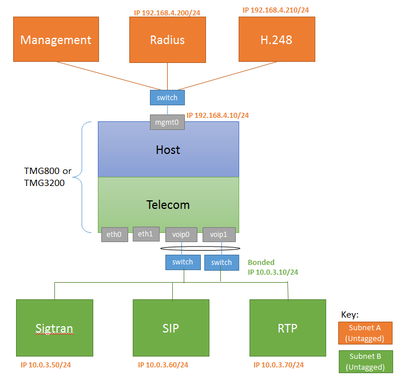
| IP Network Configuration
One subnet, Two IP Addresses, Untagged |
IP Network Configuration
Two subnets, One IP per subnet, untagged |
IP Network Configuration
Two VLAN, Three IP Addresses, tagged |
|---|---|---|
|
|
|
|


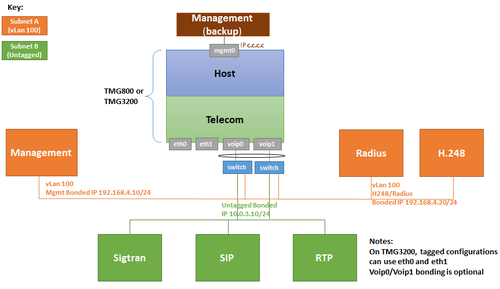
| IP Network Configuration
Two VLAN, Three IP Addresses, all through VoIP ports, tagged |
IP Network Configuration
Two tagged VLAN, Four IP Addresses, all through VoIP ports, SIP/RTP on separate IP |
IP Network Configuration
Two VLAN: tagged VLAN for management, radius and H.248, Untagged VLAN for SIP/RTP/Sigtran on separate IP, all through VoIP ports |
|---|---|---|
|
|
|
|

| IP Network Configuration
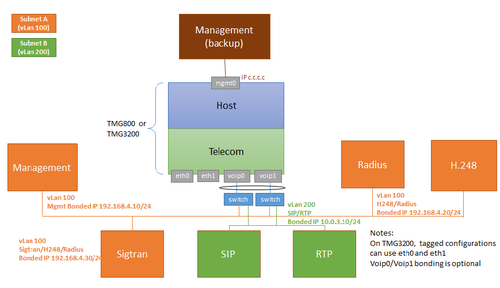
Two VLAN: tagged VLAN for management, sigtran, radius and H.248, Untagged subnet for SIP/RTP/ on separate IP, all through VoIP ports |
IP Network Configuration
Two VLAN: tagged VLAN for Sigtran, radius and H.248, Untagged VLAN for SIP/RTP on separate IP, all through VoIP ports, Management local only |
IP Network Configuration
Four VLAN: tagged VLAN 100 for management, VLAN 200 for SIP/RTP, VLAN 300 for Sigtran, VLAN 400 for Radius, all through VoIP ports |
|---|---|---|
|
|
|
|


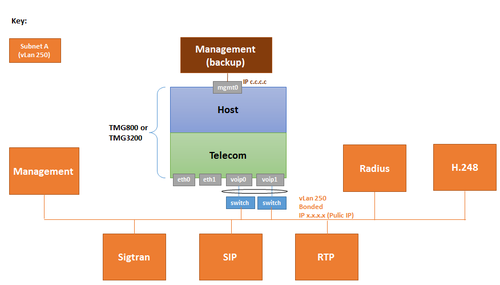
| IP Network Configuration
Four VLAN: tagged VLAN 100 for management, VLAN 200 for Sigtran, VLAN 300 RTP, VLAN 400 for H.248, all through VoIP ports |
IP Network Configuration
One VLAN, One IP Addresses, all tagged traffic one IP (TMG800 only) |
IP Network Configuration
One IP Addresses except for management, all tagged traffic, local only (TMG800 only) |
|---|---|---|
|
|
 |
|


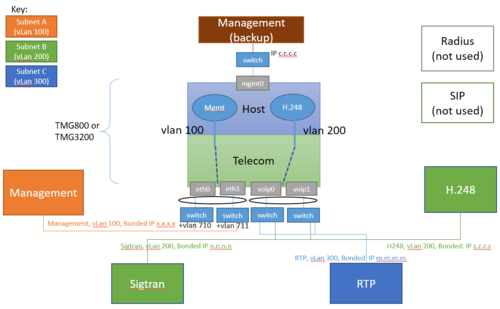
| IP Network Configuration
Three VLAN: VLAN 100 for management through ETH ports, VLAN 200 for Sigtran and H.248, VLAN 300 for RTP through VoIP ports |
|---|
|
|