Use Cases:Network Configuration IP UseCase4 A: Difference between revisions
No edit summary |
No edit summary |
||
| (One intermediate revision by the same user not shown) | |||
| Line 1: | Line 1: | ||
{{DISPLAYTITLE:IP Network Configuration Use Case:Management, Radius and H.248 on tagged VLAN, all through Voip ports, untagged SIP/RTP/Sigtran on separate IP}} | {{DISPLAYTITLE:IP Network Configuration Use Case:Management, Radius and H.248 on tagged VLAN, all through Voip ports, untagged SIP/RTP/Sigtran on separate IP}} | ||
{| class="wikitable" | |||
|- | |||
|rowspan="3"|This article applies to: | |||
|'''Product''' | |||
|'''Version''' | |||
|- | |||
|Tmedia | |||
|2.8, 2.9, 2.10, 3.0, 3.2 | |||
|} | |||
== Two VLAN: tagged VLAN for management, radius and H.248, Untagged VLAN for SIP/RTP/Sigtran on separate IP, all through VoIP ports == | == Two VLAN: tagged VLAN for management, radius and H.248, Untagged VLAN for SIP/RTP/Sigtran on separate IP, all through VoIP ports == | ||
Latest revision as of 15:40, 10 December 2020
| This article applies to: | Product | Version |
| Tmedia | 2.8, 2.9, 2.10, 3.0, 3.2 |
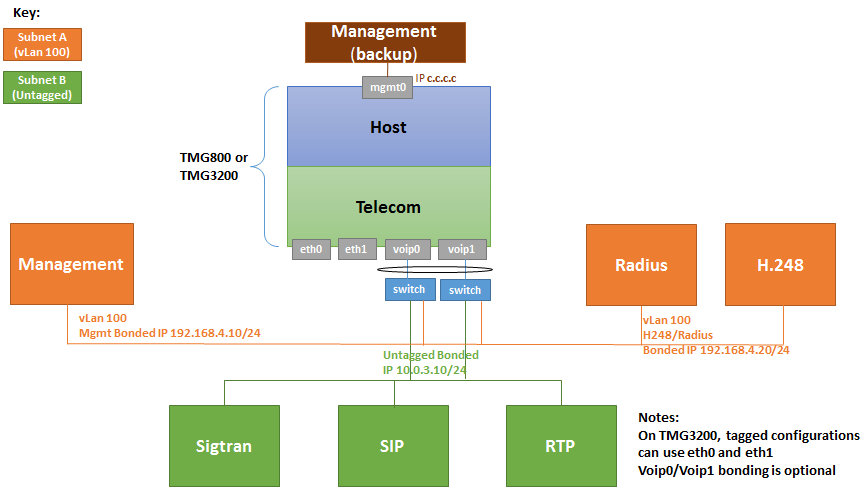
Two VLAN: tagged VLAN for management, radius and H.248, Untagged VLAN for SIP/RTP/Sigtran on separate IP, all through VoIP ports
|